PojavLauncher is an open-source Android application that allows users to run the full Minecraft Java Edition on mobile devices. Unlike typical mobile ports or emulators, PojavLauncher executes the real Java version of the game using a custom runtime environment. This makes it especially relevant for players who want access to Java-only features such as mods, custom servers, snapshots, and advanced configurations without needing a PC.
PojavLauncher matters because it blurs the line between desktop and mobile gaming. For students, travelers, developers, and mod testers, it offers a way to carry a complete Minecraft Java setup in their pocket. At the same time, it raises important technical questions about performance, legality, hardware limits, and software compatibility. Understanding how PojavLauncher works helps users make realistic expectations and avoid common mistakes that lead to crashes, overheating, or poor gameplay.
What Is PojavLauncher and What Problem It Solves
PojavLauncher is not a modified version of Minecraft, nor is it a mobile remake. It is a launcher and runtime environment that downloads and executes the official Minecraft Java files directly on Android. This means the game logic, mod system, and multiplayer protocols are exactly the same as on Windows, Linux, or macOS.
The main problem PojavLauncher solves is platform restriction. Mojang only supports Minecraft Java on desktop systems, while mobile users are limited to the Bedrock Edition. Bedrock lacks many features Java players rely on, such as Fabric mods, Forge mods, advanced redstone behavior, custom launch arguments, and snapshot testing. PojavLauncher removes this limitation by bringing Java to Android instead of forcing users into Bedrock.
In real-world usage, PojavLauncher is popular among three groups. First, students or users without access to a PC. Second, developers and mod creators who want to test builds quickly. Third, server administrators who need remote access for troubleshooting. It is less suited for casual mobile gamers who expect smooth performance without technical setup.
“PojavLauncher doesn’t replace a PC it replaces the need for one in specific scenarios.”
How PojavLauncher Works at a High Level
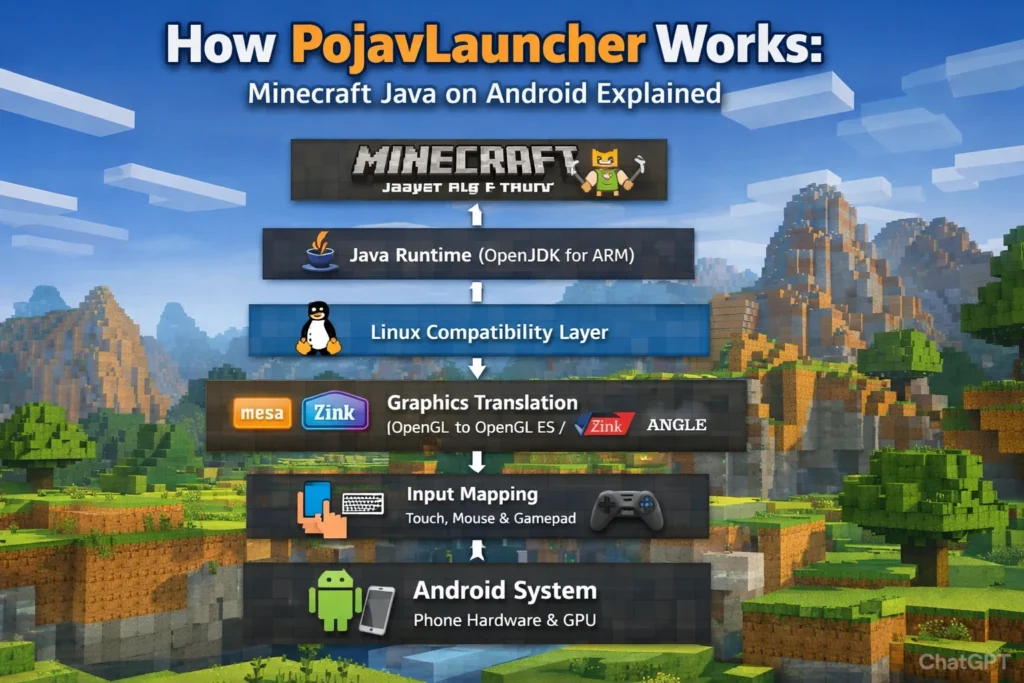
At a high level, PojavLauncher works by creating a compatibility layer between Android and desktop Java software. Instead of emulating hardware, it recreates the software environment that Minecraft expects to find on a PC.
The process starts when the user logs in and selects a Minecraft version. PojavLauncher downloads the same .jar files used on desktop. It then launches those files inside a controlled Linux-like container running on top of Android. This container provides file access, memory management, and system calls similar to a real desktop operating system.
The most complex part is graphics. Minecraft uses desktop OpenGL, while Android devices use OpenGL ES or Vulkan. PojavLauncher inserts a translation layer that converts OpenGL commands into instructions your phone’s GPU understands. This translation is what allows the game to render correctly, but it is also the main source of performance loss.
“PojavLauncher doesn’t fake Minecraft it adapts the operating system around it.”
How PojavLauncher Creates a Linux Environment on Android
Android is technically built on the Linux kernel, but it lacks many standard Linux libraries that desktop software expects. PojavLauncher compensates for this by constructing a user-space Linux environment inside the app.
This environment acts like a miniature operating system. It includes essential components such as file paths, process management, environment variables, and shared libraries. Minecraft interacts with this environment as if it were running on a normal Linux machine, even though everything is happening inside Android’s sandbox.
From a technical perspective, this approach is closer to containerization than emulation. The CPU is not being simulated; it is running real instructions natively. This is why ARM-compiled Java runtimes are required. If Minecraft depended on x86-only binaries, this setup would fail completely.
A practical implication is that some desktop mods fail because they rely on native libraries compiled for Windows or x86 processors. Java-only mods work best because they stay inside the virtual environment without touching hardware-specific components.
How PojavLauncher Runs Java on ARM Devices
Minecraft Java relies on the Java Virtual Machine (JVM). On PCs, this is typically OpenJDK or Oracle JDK compiled for x86 processors. Phones, however, use ARM architecture.
PojavLauncher solves this by bundling a version of OpenJDK compiled specifically for ARM. When the game starts, this JVM loads the Minecraft .jar file and executes it exactly like a desktop JVM would.
The JVM handles memory allocation, garbage collection, thread scheduling, and mod loading. From Minecraft’s perspective, it is running on a normal system. From Android’s perspective, it is just another application using CPU resources.
This setup is powerful but costly. Java is already resource-heavy, and running it inside a compatibility layer adds overhead. That is why PojavLauncher performs best on devices with high-end CPUs, large RAM, and efficient cooling.
“The JVM is doing real work your phone is effectively acting as a small PC.”
How PojavLauncher Translates PC Graphics for Mobile GPUs
OpenGL to OpenGL ES Translation Explained
Minecraft Java renders using desktop OpenGL. Mobile GPUs do not support the same instruction set, so PojavLauncher uses translation libraries to bridge the gap. These libraries intercept OpenGL calls and convert them into OpenGL ES or Vulkan commands.
This translation happens in real time. Every frame, every shader, and every lighting calculation passes through this layer. Even small inefficiencies multiply quickly, which explains why FPS drops dramatically in complex scenes.
Role of Mesa, Zink, and ANGLE
Mesa provides open-source GPU drivers. Zink acts as a bridge between OpenGL and Vulkan. ANGLE translates OpenGL into OpenGL ES. Together, these components form a pipeline that allows desktop graphics code to function on mobile hardware.
The downside is that mobile GPUs are optimized for simple, touch-based games, not large desktop rendering workloads. Shaders, dynamic lighting, and large modpacks stress the GPU far beyond its original design.
“Graphics translation is the single biggest performance bottleneck in PojavLauncher.”
How PojavLauncher Handles Input and Controls
Touch to Mouse and Keyboard Mapping
Minecraft expects mouse movement and keyboard input. PojavLauncher converts touch gestures into these signals. Swipes become camera movement, taps become clicks, and virtual buttons simulate keys.
This system works, but it is inherently less precise than real hardware. Fast combat, redstone wiring, and building fine structures are harder with touch controls.
External Keyboard and Gamepad Support
PojavLauncher supports external keyboards, mice, and some gamepads. When connected, these devices provide near-desktop control quality. Many experienced users consider external input essential for serious gameplay.
In practice, most performance complaints are not about FPS but about input friction. Without proper controls, even high-end devices feel awkward.
How Minecraft Java Files Are Loaded and Executed
PojavLauncher downloads official Minecraft assets from Mojang’s servers. These include game files, libraries, and version metadata. The launcher organizes them in a directory structure identical to desktop launchers.
When launched, the JVM loads these files, resolves dependencies, and executes the main Minecraft class. Mods are injected at this stage through Fabric or Forge loaders.
This means everything from save files to mod configurations works exactly as on PC. You can copy worlds between devices without conversion.
“If it works on PC, it usually works on Pojav unless it touches native code.”
Is PojavLauncher Emulation or Native Execution
PojavLauncher is not an emulator. It does not simulate hardware. Instead, it uses native execution with software compatibility layers.
The CPU runs instructions directly. The JVM runs directly. Only graphics and system calls are translated. This approach is similar to Wine on Linux or Proton on Steam Deck.
This distinction matters because emulators introduce massive overhead. PojavLauncher’s overhead is significant, but far lower than full system emulation.
Why Performance Varies by Device
Performance depends on four main factors: CPU speed, GPU driver quality, RAM, and thermal design. Two phones with identical processors can perform very differently due to cooling and driver support.
High-end Snapdragon devices perform best because their GPUs support Vulkan efficiently. Mid-range devices struggle with newer Minecraft versions. Low-end phones are often limited to older releases like 1.12 or earlier.
Thermal throttling is another hidden issue. After 10–15 minutes, many phones reduce CPU speed to avoid overheating, causing sudden FPS drops.
“Short tests lie real performance shows after 20 minutes.”
Common Technical Limitations and Bottlenecks
The most common limitations include overheating, memory exhaustion, incompatible mods, and unstable GPU drivers. Users often blame PojavLauncher, but most issues originate from hardware constraints.
Mistakes to avoid include installing large modpacks, enabling shaders on weak GPUs, and running high render distances. These configurations work on PCs but overwhelm mobile systems.
Expert users recommend treating PojavLauncher as a testing or utility tool, not a full replacement for desktop gaming.
How Mods and Shader Support Work in PojavLauncher
Which Mods Work and Which Fail
Pure Java mods work best. Fabric and Forge loaders are fully supported. Mods that include native binaries or depend on Windows APIs often fail.
Why Some Shaders Are Unsupported
Shaders rely heavily on GPU features. Many shaders assume desktop OpenGL behavior that mobile GPUs cannot reproduce accurately. Even when they load, performance is usually unacceptable.
“If a shader looks good, it probably runs badly.”
Security, Legality, and Account Authentication
PojavLauncher is legal if you own Minecraft Java and log in with a legitimate Microsoft account. It does not distribute pirated game files.
Security risks mainly come from unofficial builds or cracked accounts. These can expose users to malware or account bans.
From a legal and ethical standpoint, using PojavLauncher responsibly is no different from using any other third-party launcher.
Frequently Asked Questions
Is PojavLauncher safe to use?
Yes, PojavLauncher is safe if downloaded from its official source and used with a legitimate Minecraft account. It is open-source, meaning its code is publicly available and audited by the community. Security risks usually come from unofficial APK files or modified builds shared on third-party websites, which may contain malware or spyware.
Do I need to own Minecraft to use PojavLauncher?
Yes. You must legally own Minecraft Java Edition and log in using a Microsoft account. PojavLauncher does not provide game files; it only downloads them from Mojang’s official servers. Using cracked accounts or pirated files violates Mojang’s terms and can result in bans.
Can PojavLauncher run all Minecraft versions?
PojavLauncher supports most versions from Minecraft 1.0 to the latest release, including snapshots. However, newer versions (1.18+) require significantly more CPU and RAM, making them unstable or unplayable on mid-range and low-end devices.
Does PojavLauncher support mods?
Yes. It supports both Forge and Fabric mods, just like PC. Pure Java mods work best. Mods that rely on native Windows or x86 binaries often fail because Android cannot run them.
Can I use shaders with PojavLauncher?
Technically yes, but realistically no for most users. Shaders require advanced GPU features that many mobile GPUs do not support. Even when shaders load successfully, performance is usually very poor.
Is PojavLauncher an emulator?
No. It is a compatibility layer, not an emulator. It runs real Minecraft Java code directly on your CPU. Only graphics and system calls are translated.
Does PojavLauncher work on iPhone?
No. iOS does not allow the system-level access required for PojavLauncher. There is no functional equivalent on iOS due to Apple’s sandboxing restrictions.
Can I transfer my worlds from PC?
Yes. You can copy your .minecraft/saves folder directly into PojavLauncher. Worlds are fully compatible.
Conclusion
PojavLauncher works because it combines a Linux compatibility layer, an ARM-based Java runtime, and real-time graphics translation to recreate a desktop environment on Android. It does not emulate hardware, but it does push mobile devices far beyond their original purpose. This makes it a powerful tool for testing, learning, and remote access, but not a perfect gaming solution.
For best results, users should treat PojavLauncher as a specialized utility, not a mainstream gaming platform. Use external input devices, avoid heavy shaders, limit modpacks, and manage thermal performance. When used with realistic expectations, PojavLauncher becomes one of the most impressive examples of cross-platform engineering in the gaming world.
You have not enough Humanizer words left. Upgrade your Surfer plan.